

PlotterGeeks
LineaForge: Vector Design & Cut Software for Vinyl Cutters and Pen Plotters
LineaForge: Vector Design & Cut Software for Vinyl Cutters and Pen Plotters
Couldn't load pickup availability
Draw it, set it up, send it. One license, every feature.
LineaForge is vector design software built for cutting vinyl and drawing with pens. Draw or import your artwork, set each object to Cut, Draw or Ignore, preview the toolpath on the canvas, and send the job over USB, serial or Wi-Fi. There is no Standard and no Pro: weeding boxes, DXF import, cut order, per-object force and speed, line fills, 3D extrude and a full toolpath preview are all included. One activation PIN covers two computers, Mac or Windows.
Most cutter software treats a pen as an afterthought. LineaForge gives every object a plot role: Cut, Draw or Ignore. Cuts get blade offset and overcut, draws do not, and a two-head machine routes each to the right carriage on its own. Fill a shape with hatching, waves or cells and the pen draws the inside while the blade cuts the edge, in one job. Before anything moves, the toolpath preview shows cuts in green, pen strokes in blue and travel moves in dashed orange, right on top of your artwork.
It is also a full vector editor: pen and node tools, boolean operations, offset path, arrays, text on arcs and paths, Google Fonts, shadows, 3D extrude, image tracing, and several artboards in one file. Autosave keeps a recovery copy of unsaved work, and the searchable user guide lives inside the app and works offline.
Design it all in one place
From blank page to finished badge, without leaving the app. The camp badge in this screenshot was built entirely in LineaForge. The title curves around the ring with arc text, the footer runs along a path, and the script word carries a drop shadow. The ring of stars came from the Array panel, the hills are a line fill a pen will draw, and the pines are a group you can collapse in the Objects panel. Guides, snapping, locked rings and hidden alternates are all there, so a complex design stays easy to edit.
Every fill is a pen path
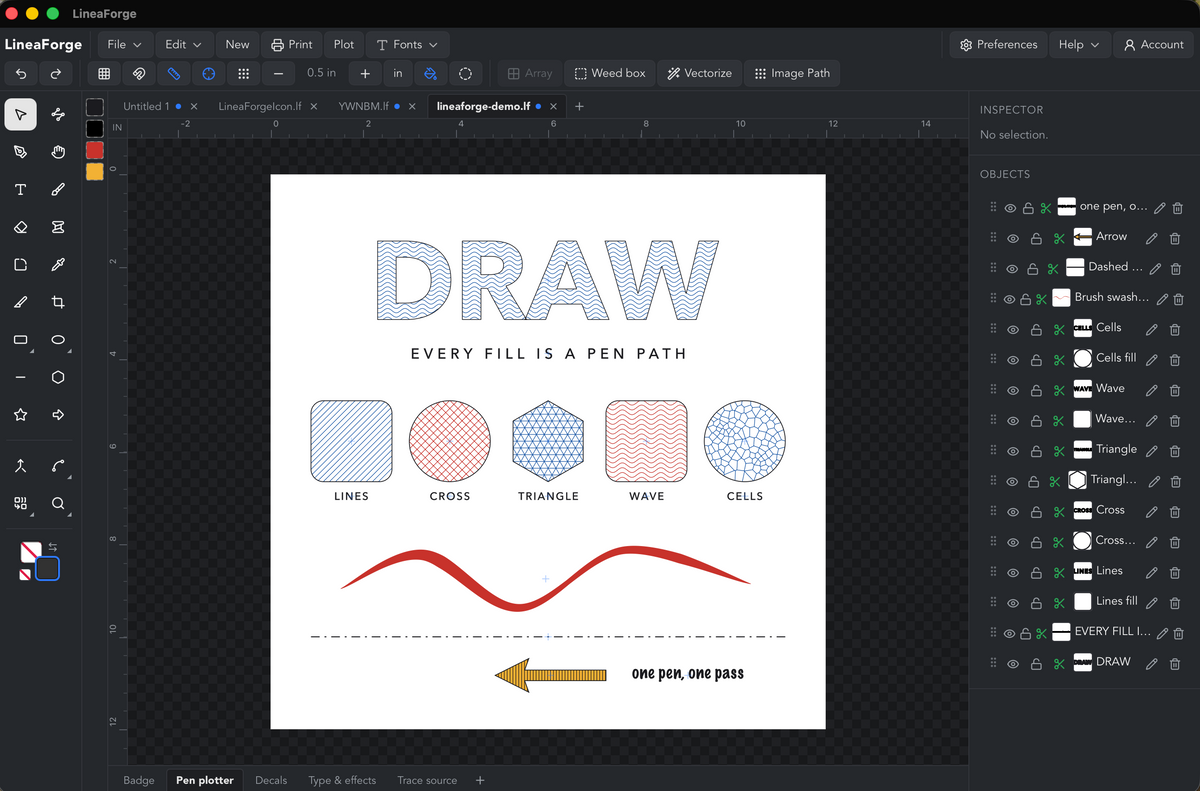
 Pick a shape, choose a line fill, and the pen draws it: parallel lines, crosshatch, triangles, waves or Voronoi cells, each with its own spacing, angle, color and plot role. Fill a headline with waves. Give a path a Stroke Profile and the width swells and tapers like a brush. Dash patterns, block arrows and per-object pen colors round it out, and Prompt for tool change runs a multi-color drawing on a single-head machine one pen at a time.
Ready for the blade
Lay out the sheet, cut it.

Six stickers in three vinyl colors on a Letter sheet, with a weed box round the lot so the waste lifts in one piece. Set force, speed and passes per object when one material needs more than the default. Set the machine's registration marks and the same sheet goes through Print with marks and the Print & Cut section for a contour cut on a printed design.
typography that cuts clean
Real type tools, not just a text box. Drop, block and cast shadows. 3D extrude with STL export. Tracking, kerning and multi-line alignment. Text on an arc or along any path you draw. Every font installed on your computer plus a built-in Google Fonts browser that downloads straight into the project. When the lettering is final, convert it to paths, weld the script into a single cut line, and send it.
From picture to paths
Trace it, or draw it as pen patterns.
 Drop in a PNG, JPEG or WebP. Vectorize traces it into cuttable outlines or color pieces, with noise cleanup and a trace offset for a clean sticker edge; a cutout on a transparent background gets its cut line traced on import. Image Path redraws a photo as stipple, hatching, sketch strokes, flow lines, squiggles, a spiral, one continuous line or layered vexel posters, ready for the pen.
Compatibility and what is included
A specs block for the lower part of the product page. Every row comes from the in-app user guide.
|
|
|
|---|---|
|
Platforms |
Windows 10 and 11; macOS, Apple Silicon and Intel |
|
License |
One activation PIN, active on up to 2 computers at a time, Mac or Windows. Deactivate and move from inside the app. |
|
Editions |
One. No Standard or Pro tier. |
|
Cutters and plotters |
Skycut C, D and V series; StarCraft SOLO; Siser Romeo and Juliet; GRBL and G-code plotters; generic HPGL cutters |
|
Connections |
USB (direct), serial or COM port, Wi-Fi, printer or driver queue, or export the job as a .gcode or .plt file |
|
Per-object plot settings |
Cut, Draw or Ignore role; head on two-head machines; force, speed and passes overrides |
|
Opens and imports |
.lf projects, SVG, DXF, PDF, EPS, Adobe Illustrator (.ai), PNG, JPEG, GIF, BMP, WebP |
|
Exports |
SVG, PDF, DXF, EPS, STL (3D), PNG, JPEG, WebP, favicon set |
|
|
Print dialog with preview, printer margins on the artboard, print with registration marks for print and cut |
|
Fonts |
Every installed system font, plus a Google Fonts browser that downloads into the project |
|
Documents |
Several artboards (sheets) per project, project tabs, autosave with crash recovery, inches or millimeters |
|
Help |
Searchable user guide inside the app, works offline; bug reports and feedback sent from the Help menu |
|
Updates |
In-app update check and install |
FAQ
Shopify's collapsible-row section works well for these.
Does it work with my cutter? LineaForge ships profiles for the Skycut C, D and V series, the StarCraft SOLO, the Siser Romeo and Juliet, GRBL and G-code pen plotters, and generic HPGL cutters. If yours is not listed, add a Generic HPGL or G-code machine and tune it; the settings are saved against it. Tell us what you got working from Help, Contact & feedback and we will add it properly.
Is there a Pro version? No. There is one edition and it includes everything: weeding boxes, DXF import, cut order, per-object force and speed, line fills, 3D extrude, print and cut, and the toolpath preview.
How many computers can I install it on? Two at a time, on any mix of Mac and Windows. If you replace a computer, open Account in the app, deactivate, and activate the new one. Activation needs an internet connection once; after that the app runs offline.
Can I use it for pen plotting, not just cutting? Yes, that is the point of it. Every object can be Cut, Draw or Ignore, line fills turn any shape into pen strokes, Stroke Profile gives a path a brush-like width, and Image Path redraws a photo as stipple, hatching, flow lines, a single continuous line and more.
What files can I open? SVG, DXF, PDF, EPS and Adobe Illustrator files, plus PNG, JPEG, GIF, BMP and WebP images. Text in a PDF, EPS or AI file should be converted to outlines first.
Can I print and cut? Yes. Turn on registration marks in the Plotter dialog, print the sheet with marks from the app, and the cutter's camera finds the marks. See the note on hardware testing below before you rely on it for a paid job.
What happens if the app crashes? Autosave keeps a private recovery copy of unsaved work. On the next launch, LineaForge offers to recover it. It never overwrites the file you saved on purpose.
Where is the manual? Inside the app, under Help. It is searchable and works without an internet connection.